• Skip to primary navigation
  • Skip to main content
Contact
Beech Village Hall logo

clientsite.uk

  • What’s on
    • What’s on
    • Browse events
    • Booking information
    • Beyond Beech
  • Health & Wellbeing
    • Health & Wellbeing
    • Meet our Practitioners
    • Join our Practitioner community
  • Hire a space
    • Hire a space
      • Hire a space
      • Celebrations and Life Events
      • Children’s parties
      • Commemorations
      • Groups and organisations
      • Wedding receptions
    • Check availability
      • Check availability
      • Main Hall availability
      • The Wellhouse availability
    • Find caterers and suppliers
    • Packages and pricing
  • Community
    • Community
    • Community Groups and Clubs
    • Members’ corner
    • Browse Volunteer roles
    • Community information

Using our screens / displays

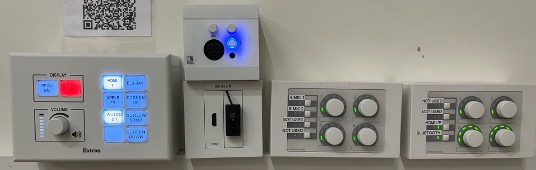
How to use the Audio Visual system in the main hall?

8 December, 2024

The main hall has a range of audio visual equipment to support:

  • Music and dance played through a 2 channel disco sound system with disco lights and a choice of inputs:
    • BlueTooth
    • 3.5mm jack plug
    • HDMI
  • Presentation from a computer using an HDMI input
  • Public address using a microphone
  • Film and theatre presentations to our 4.5M wide screen using a 4K UHD 7,500 Lumens laser projector from:
    • UHD Blu-ray disc
    • Digital streaming services for example BBC iPlayer
  • Live events broadcast using digital streaming services

How to use the Audi Visual (AV) system

Please review our BVH Audio Visual system user guide

Please note:

  1. Whilst the hall has a Premises License that covers these activities the hirer is responsible for ensuring they have the appropriate copyright licenses for the materials that they use.
  2. As we are located in a quiet and peaceful village with close neighbours we specify a maximum noise level in our terms and conditions. For more information please see this FAQ article:
    • clientsite.uk/faq/is-there-a-limit-on-the-volume-of-music/
  3. Usage of some our Blu-ray player or microphones requires access to our media cupboard which must be arranged in advance.
Can I use a projector?

28 November, 2023

We have projectors to hire in:

  • Main hall
  • Wellhouse

When you make you booking request please let us know if you would also like to hire the projector.

Connection to the projectors is via HDMI. Please bring your own HDMI lead.

How to use the main hall Audio Visual System?

Please review our BVH Audio Visual system user guide

Can I bring a USB stick to upload my file?

28 November, 2023

No, we only accept files transferred electronically.

  • Our digital signs are run by a system called Yodeck which allows us to schedule different content to run on each screen.
  • Any content has to be uploaded to the Yodeck system and then scheduled to play.

How do I send my file to you?

28 November, 2023

Please send a single file no larger than 100Mb.

Most email clients limit the size of attachments to no more than 20 or 25Mb.

You can email small files to:

bookings@beechvillage.org.uk

For larger file you will need to use a tool like WeTransfer or a file sharing tools like Microsoft OneDrive, Googledrive.

Please allow plenty of time to send the file to us.

What format of digital file do you require to use the screen in the entrance hall?

28 November, 2023

For the large screen in the entrance hall you shoud create a single digital file:

  • Landscape format with an aspect ratio of 1920 x 1080 (16:9)

For the small screen in the lounge/bar area:

  • Portrait format with an aspect ratio of 1920 x 1080

We can process most file formats eg PPT, MOV, JPG and PDF.

We request you limit the size of the file to a maximum of 100Mb.

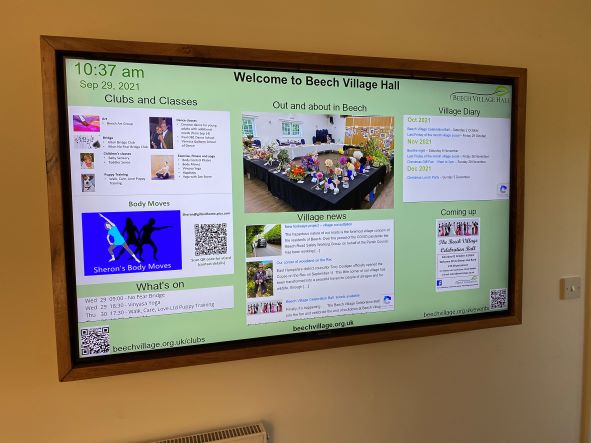
How to use the screen in the entrance hall?

28 November, 2023

If you have booked one of our packages you are welcome to use our digital signage system. The system includes:

  1. The large TV screen in the main corridor
  2. A smaller monitor in the lounge bar area
  3. Software to schedule the display

For example, you might want to show a static welcome page, a table plan or a scrolling selection of family photographs.

You will need to provide us with the material one week in advance.

You will need to provide us with:

  1. A Powerpoint, pdf or .mov file containing the material you wish to show, at least 7 days in advance of the hire date.
  2. By default, we will schedule your material so that it appears on the screen during the hours you have booked the Hall. If you only want it to show for a specific period of time, let us know.
  3. If you provide a multi page PDF or PPT file, each page will appear for 5 seconds by default. This can be adjusted if you let us know how long you want each page to appear for.

Please note:

  1. The TV screen is managed remotely by us and you will not be able to make any changes on-site.
  2. There is no provision for sound on this system.
  3. It is your responsibility to ensure that you have the appropriate approvals to use the material you send us. This may include copyright or a licence for images, and permission from people appearing in the pictures (or, where applicable, their parents or guardians).
  4. To deliver this service, we will upload the file you provide onto the platform of our service provider, Yodeck. We will delete all your materials from the platform shortly after your event

  • About
  • FAQ
  • Legal