• Skip to primary navigation
  • Skip to main content
Contact
Beech Village Hall logo

clientsite.uk

  • What’s on
    • What’s on
    • Browse events
    • Booking information
    • Beyond Beech
  • Health & Wellbeing
    • Health & Wellbeing
    • Meet our Practitioners
    • Join our Practitioner community
  • Hire a space
    • Hire a space
      • Hire a space
      • Celebrations and Life Events
      • Children’s parties
      • Commemorations
      • Groups and organisations
      • Wedding receptions
    • Check availability
      • Check availability
      • Main Hall availability
      • The Wellhouse availability
    • Find caterers and suppliers
    • Packages and pricing
  • Community
    • Community
    • Community Groups and Clubs
    • Members’ corner
    • Browse Volunteer roles
    • Community information

Sound system and noise

How to use the Audio Visual system in the main hall?

8 December, 2024

The main hall has a range of audio visual equipment to support:

  • Music and dance played through a 2 channel disco sound system with disco lights and a choice of inputs:
    • BlueTooth
    • 3.5mm jack plug
    • HDMI
  • Presentation from a computer using an HDMI input
  • Public address using a microphone
  • Film and theatre presentations to our 4.5M wide screen using a 4K UHD 7,500 Lumens laser projector from:
    • UHD Blu-ray disc
    • Digital streaming services for example BBC iPlayer
  • Live events broadcast using digital streaming services

How to use the Audi Visual (AV) system

Please review our BVH Audio Visual system user guide

Please note:

  1. Whilst the hall has a Premises License that covers these activities the hirer is responsible for ensuring they have the appropriate copyright licenses for the materials that they use.
  2. As we are located in a quiet and peaceful village with close neighbours we specify a maximum noise level in our terms and conditions. For more information please see this FAQ article:
    • clientsite.uk/faq/is-there-a-limit-on-the-volume-of-music/
  3. Usage of some our Blu-ray player or microphones requires access to our media cupboard which must be arranged in advance.

Is there a limit on the volume of music?

28 November, 2023

As we are located in a quiet and peaceful village with close neighbours we specify a maximum noise level in our terms and conditions.

  1. We ask that windows and external doors are closed when loud music is being played inside the hall.
  2. We prohibit the playing of music outside of the hall without our express permission.

We have a number of system to help monitor and control noise levels:

  1. A sound decibel meter to enable hirers to understand the noise level in real time
  2. A noise monitoring service provided by Minut that records the noise level in the hall. Please note that we do not record conversations. Please use this link for the Minut privacy policy
  3. A noise limiting system. The noise limiter has two parts”:
    1. A ‘traffic light’ display in the main hall. The light flash orange as the noise level nears the limit and red when the limit is exceeded
    2. A power cutout to the main hall when the noise limit is exceeded for more than 10 seconds.

How to use the sound system?

28 November, 2023

The easiest way to use our sound system is via a Bluetooth connection.

  • You need to be in the far right corner of the main hall to connect


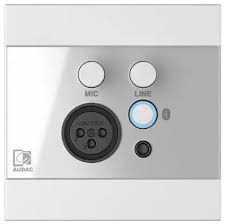
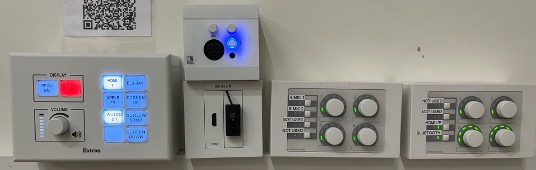
  • Press the button indicated to start Bluetooth:
  • You should connect your phone/laptop to the device named ‘WP225’
  • You will then be able to play music from your phone/laptop and also control the volume level.

Please note:

  • Connect to our wifi first to improve streaming
  • You will need to keep your bluetooth device within range of our amplifier

Alternatively, you can connect by cable:

The Bluetooth connection box and the box beneath it also have sockets to connect via:

3.5mm jack

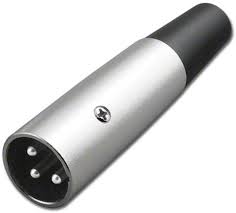
3 pin XLR microphone plug:

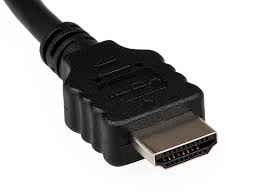
Or HDMI:

How to use the main hall Audio Visual System?

Please review our BVH Audio Visual system user guide

  • About
  • FAQ
  • Legal