• Skip to primary navigation
  • Skip to main content
Contact
Beech Village Hall logo

clientsite.uk

  • What’s on
    • What’s on
    • Browse events
    • Booking information
    • Beyond Beech
  • Health & Wellbeing
    • Health & Wellbeing
    • Meet our Practitioners
    • Join our Practitioner community
  • Hire a space
    • Hire a space
      • Hire a space
      • Celebrations and Life Events
      • Children’s parties
      • Commemorations
      • Groups and organisations
      • Wedding receptions
    • Check availability
      • Check availability
      • Main Hall availability
      • The Wellhouse availability
    • Find caterers and suppliers
    • Packages and pricing
  • Community
    • Community
    • Community Groups and Clubs
    • Members’ corner
    • Browse Volunteer roles
    • Community information

Appliances

How to use the Dishwasher in the kitchen?

21 December, 2023

The dishwasher is a ‘commercial’ dishwasher. Unlike a home dishwasher, the system is reliant on pre heating the water to enable a rapid cycle time. This works well if you follow a few simple instructions

  1. Allow 20-40 minutes for the machine to pre-heat
  2. Always rinse food debris off the plates before washing
  3. Always remember to follow the draining down instructions at the end of the event

To operate the dishwasher please use the buttons on the front of the machine:
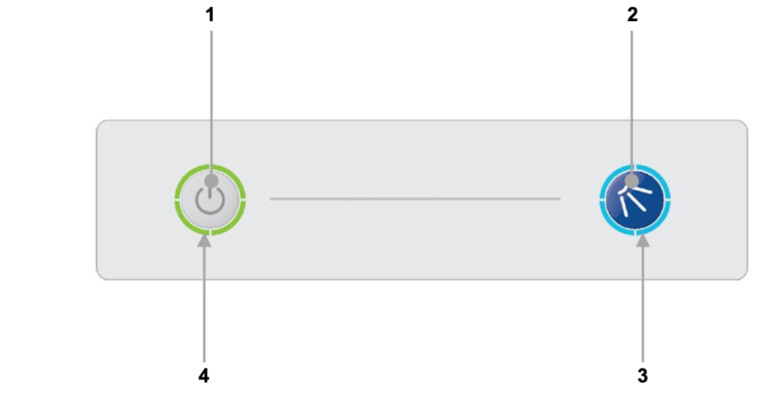
  1. On/Off button
  2. Cycle button
  3. Cycle indicator
  4. Heating indicator

Turning on the machine

To turn on the machine ensure the door is closed and press the On/Off button (1) on the keypad of the machine, the display will illuminate, the machine will start to fill automatically as long as the door is closed.

Once the wash tank is filled and both tanks are up to the required temperatures the heating indicator will illuminate green to indicate the machine is ready to run a cycle.

  1. This will take approximately 20-40 minutes.
  2. During the fill stage the heating indicator (4) will flash amber.

Loading a basket

Before loading a basket rinse off any food waste:

  • Always remove excess food/debris from any dishes/glasses to be washed. DO NOT use the machine as a waste disposal unit.

Long cutlery, such as ladles and long knives etc., must be placed horizontally on the open basket this will avoid possible collision with wash/rinse arms.

Starting a cycle

To start a cycle, follow the instructions below.

  1. Open the door
  2. Load the full basket, ensuring that bottom and top arms rotate freely.
  3. Close the door
  4. Press the cycle button (2).
    1. The cycle will start once the machine has achieved its correct water levels and temperatures.
    2. During the cycle the blue cycle indicator (3) will be illuminated blue.
    3. The cycle will run for approximately 3 minutes.
  5. At the end of the cycle, once the cycle indicator (3) has gone out. Open the door and remove the basket
  6. Reload the machine and repeat as required.

Please note:

  1. Do NOT open the door during a cycle
  2. The machine has a heat interlock to ensure that the rinse is in accordance with environmental health requirements. This will extend the wash cycle if the rinse boiler has not achieved the required temperature.
  3. If the cycle button is pressed before the machine has reached the required levels the cycle indicator (3) will illuminate blue to indicate that a cycle has been selected, the heating indicator (4) will flash amber and the machine will automatically start when the requirements have been met.

Warning

Items in the basket may be wet and will dry in a short time due to evaporation.

Be aware: Items may be hot when removed from machine

End of event, please drain the machine

It is very important the machine is drained down at the end of each working day. To fully drain down the machine follow these instructions:

  1. Close the door to the machine
  2. Press the On/Off button (1) to turn off the machine.
  3. Press the cycle button (2)
  4. The cycle indicator (3) will flash blue.
  5. The machine will drain down the wash tank.
  6. The machine will do a self-rinse.
  7. When the cycle indicator (3) goes out the drain cycle is complete.

How to control the Wellhouse heating?

20 December, 2023

The heating in The Wellhouse is underfloor and the heat source is an external air source heat pump. The design is to keep The Wellhouse warm and cosy at all times!

  1. The Wellhouse was refurbished in 2025 and is extensively insulated and the main source of heat loss is when the extrance door is left open. 
  2. Please ensure that you keep the entrance door closed to maintain the temperature.

The temperature is controlled by thermostats in each room. The temperature is normally set based on a schedule but can be manually overridden by pressing the in room thermostat.


How to use the Glasswasher (in the lounge/bar area)?

19 December, 2023

  1. Prepare dishwasher
    1. Open door, and put water plug in base of washing area, under tray.
    2. Replace tray, close door, and push in left hand power button.
  2. Washer should now fill, and heat the water – heating light will glow.
    1. When water is hot the orange light by right hand button will go out.
    2. It is now ready to use.
  3. To wash glasses:
    1. Fill glass tray, and when ready,
    2. Close door, then
    3. Push-and-hold right hand button in for a second or two.
    4. Washing cycle will now start – and end after around 3 minutes.
  4. Glasses will now be hot, and clean.
    1. Either leave to air or dry with towel and replace on shelf
  5. At end of evening:
    1. Remove water plug, rest it in the tray, and close door.
    2. Water will now pump out automatically.
    3. Check inside that it is empty.
    4. Press power switch and see power light go out.
    5. Close door.
  6. Any problems, ask a Committee member near you!

How to use the sound system?

28 November, 2023

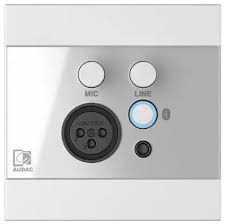
The easiest way to use our sound system is via a Bluetooth connection.

  • You need to be in the far right corner of the main hall to connect


  • Press the button indicated to start Bluetooth:
  • You should connect your phone/laptop to the device named ‘WP225’
  • You will then be able to play music from your phone/laptop and also control the volume level.

Please note:

  • Connect to our wifi first to improve streaming
  • You will need to keep your bluetooth device within range of our amplifier

Alternatively, you can connect by cable:

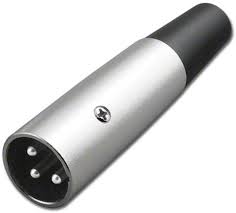
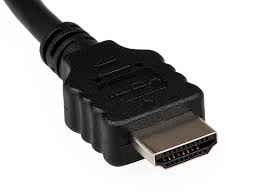
The Bluetooth connection box and the box beneath it also have sockets to connect via:

3.5mm jack

3 pin XLR microphone plug:

Or HDMI:

How to use the main hall Audio Visual System?

Please review our BVH Audio Visual system user guide

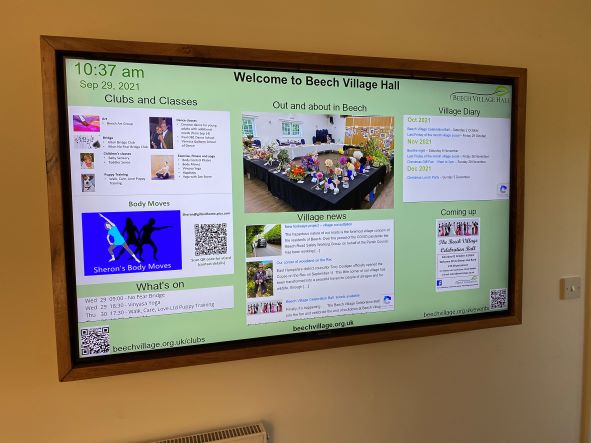
How to use the screen in the entrance hall?

28 November, 2023

If you have booked one of our packages you are welcome to use our digital signage system. The system includes:

  1. The large TV screen in the main corridor
  2. A smaller monitor in the lounge bar area
  3. Software to schedule the display

For example, you might want to show a static welcome page, a table plan or a scrolling selection of family photographs.

You will need to provide us with the material one week in advance.

You will need to provide us with:

  1. A Powerpoint, pdf or .mov file containing the material you wish to show, at least 7 days in advance of the hire date.
  2. By default, we will schedule your material so that it appears on the screen during the hours you have booked the Hall. If you only want it to show for a specific period of time, let us know.
  3. If you provide a multi page PDF or PPT file, each page will appear for 5 seconds by default. This can be adjusted if you let us know how long you want each page to appear for.

Please note:

  1. The TV screen is managed remotely by us and you will not be able to make any changes on-site.
  2. There is no provision for sound on this system.
  3. It is your responsibility to ensure that you have the appropriate approvals to use the material you send us. This may include copyright or a licence for images, and permission from people appearing in the pictures (or, where applicable, their parents or guardians).
  4. To deliver this service, we will upload the file you provide onto the platform of our service provider, Yodeck. We will delete all your materials from the platform shortly after your event

  • About
  • FAQ
  • Legal