• Skip to primary navigation
  • Skip to main content
Contact
Beech Village Hall logo

clientsite.uk

  • What’s on
    • What’s on
    • Browse events
    • Booking information
    • Beyond Beech
  • Health & Wellbeing
    • Health & Wellbeing
    • Meet our Practitioners
    • Join our Practitioner community
  • Hire a space
    • Hire a space
      • Hire a space
      • Celebrations and Life Events
      • Children’s parties
      • Commemorations
      • Groups and organisations
      • Wedding receptions
    • Check availability
      • Check availability
      • Main Hall availability
      • The Wellhouse availability
    • Find caterers and suppliers
    • Packages and pricing
  • Community
    • Community
    • Community Groups and Clubs
    • Members’ corner
    • Browse Volunteer roles
    • Community information

Hall hire

How to report a problem or incident?

20 December, 2023

Here the numbers to call for immediate help. After the incident please ensure the details are reported using this Problem reporting form or email bookings@beechvillage.org.uk

In case of Accident, Injury or Safeguarding concern:

What

What/Where

Call

Emergency


999

Not sure what to do?

NHS 111 can help if you have an urgent medical problem

111

Defibrillator

Outside the front entrance on the right

(dial 999 for assistance)

First Aid kit

In the Village Hall kitchen


Hospital A&E

Basingstoke NHS Foundation Trust, Aldermaston Rd, Basingstoke, RG24 9NA

01256 473202

Doctors Surgery

Chawton Park Surgery, Chawton Park Road, Alton, GU34 1RJ

01420 542542

Out of hours:

0208 390 9991

Safeguarding

Emergency

999

Child or Adult in danger

101

Report a concern about a child

0300 555 1384

Report a concern about an adult

0300 555 1386

In the event of Fire

16 December, 2023

Who is responsible

The Hirer or the Event organiser is deemed the “Responsible Person” and is designated the person in charge of the Hall/Room during the hire period or event.

Prior to your event you must make a plan of who and how you will manage the evacuation of your guests in the event of a fire. We detail how to do this in our User Guide and document below the summary.

Before the event:

You need a plan before the event so you can evacuate the building quickly and safely:

Appoint and brief your ‘fire marshalls’:

  • Appoint at least 1 Fire Marshall per 50 guests to OWN the plan.
  • Ensure they understand their role and your plan based on the information below

When you arrive:

Review the emergency procedures on the hall noticeboard:

  • The action to be taken in event of fire
  • The location and use of fire equipment
  • Escape routes and the need to keep them clear.
  • That all fire exits are unlocked and you know how to open them.
  • The importance of closing fire doors in the event of a fire and that any fire doors are not wedged open.
  • That exit signs are clear.
  • Any potential fire hazards on the premises are supervised.

In the event of a fire:

What to do when a fire is detected?Take charge!
Trigger the Fire Alarm.
Get everyone out of the building.
Check everyone is out.
Evaluate using the Fire Extinguishers.
Call the Fire Brigade.
Do not let anyone back into the hall until it is safe.
After the incident report it to us.
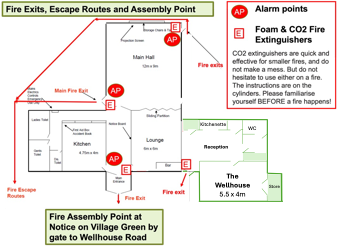
How to trigger the Fire Alarm?Use the Fire Alarm points in the Entrance or Main Hall as marked on the drawing below.
Should we use the fire extinguishers?Attempts to extinguish the fire using the extinguishers should only be carried out if it is considered safe. If in any doubt, get out of the building.
Where are the Fire Extinguishers?The Fire Extinguishers are marked on the drawing below.
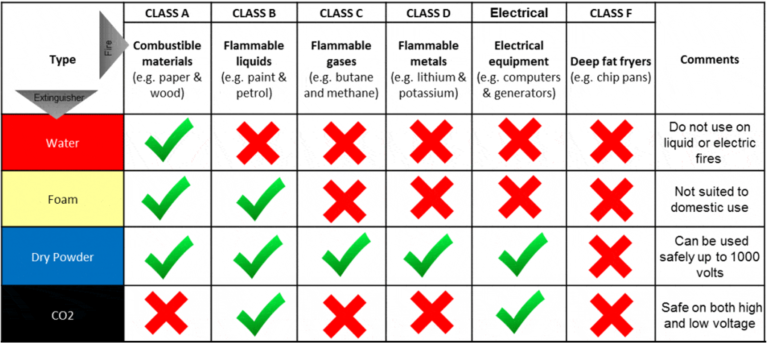
Which type of fire extinguisher should we use?
How to use the Fire Extinguishers?1. Identify a clear escape route.
2. If you cannot put out the fire, you’ll need a safe exit.
3. Stand back between 6 and 8 feet.
4. Face the fire and keep your back to exit.
Discharge extinguisher:
P: Pull the pin on the fire extinguisher.
A: Aim the extinguisher nozzle toward the base of the fire.
S: Squeeze the handle or lever to discharge the extinguisher.
S: Sweep the nozzle back and forth, aiming at the base of the fiew.
How to evacuate from the building?The Fire Exits are marked on the drawing below
Where to assemble?The Fire Assembly Point is on the village green by the children’s play area.
How to check everyone is out of the building?Check each of the 3 toilets.
Check the kitchen.
Check the Wellhouse and toilet (if being used).
How to call the Fire Brigade?Call 999
And give the address:
Beech Village Hall. Wellhouse Road, Beech, Alton, Hampshire GU34 4AD.

After the firePlease ensure you report any incident to using the ‘Contact‘ button at the top of the page

Health and Wellbeing

16 December, 2023

For more information on how to book our facilities for your class, meeting or therapy session please review our Health and Wellbeing page or download our

Health and Wellbeing team guide

If you want to attend one of the many clubs and classes running at Beech Village Hall please visit our Clubs and Classes page.

To discuss your options and arrange a tour, please email us or phone us on 07501 187496.


Directory of Wedding and Party suppliers and caterers

16 December, 2023

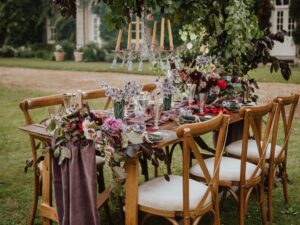
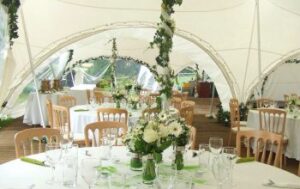
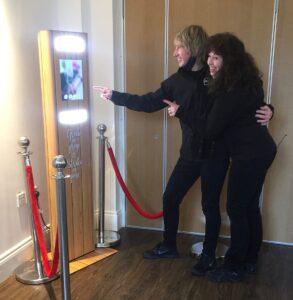
Do you need help with catering, bar, decoartions, a marquee, furniture, a cake, photo booth or flowers? Please review our list of weedding and party suppliers:

A Bit of a Do Events

We are a family run business and love to go the extra mile to look after our…

Read more

AM & PM Catering

AM & PM Catering: Established back in the last century, 1981 to be precise, we’ve collected most…

Read more

Bounce 4 Fun

Bounce 4 Fun is a family run business with over 10 years experience in the inflatable world. We…

Read more

Crystal Hire

Crystal Hire: We pride ourselves on offering our clients the very best in tables, chairs, glassware, cutlery,…

Read more

Disco Skate

I am an experienced skater and party organiser who through skates that are maintained to plod not…

Read more

Food Inspirations

Food Inspirations: Having been a chef for 30 years I started my own event catering buisness Food…

Read more

Grassi & Jones

Grassi & Jones: Food just tastes better when it’s beautiful, so let us help you capture the…

Read more

JV Bouncy Castle Hire

JV Bouncy Castle Hire Basingstoke As a family run local company, we believe that the bouncy castle…

Read more

Medstead Marquees

Medstead Marquees specialise in elegant and contemporary marquee hire. Furniture, flooring and decorations are also available to…

Read more

Party Delights Photo Booth

Party Delights Photo Booth are looking to take your wedding, birthday or corporate event to the next…

Read more

Hall User Guide

16 December, 2023

To help you prepare to use our Hall we have prepared our BVH hall user guide 

This document is essential reading to help you plan for a successful event! It’s structured into the following sections:

  1. Planning for success
  2. Preparing for the worst
  3. In the event of fire
  4. When your arrive
  5. During your event
  6. Before you leave
  7. As you leave
  8. After your event

How to use our equipment:

  • All
  • Appliances
  • Sound system and noise
  • Using our screens / displays

Can I bring a USB stick to upload my file?

No, we only accept files transferred electronically.

  • Our digital signs are run by a system called Yodeck which allows us to schedule different content to run on each screen.
  • Any content has to be uploaded to the Yodeck system and then scheduled to play.

Can I use a projector?

We have projectors to hire in:

  • Main hall
  • Wellhouse

When you make you booking request please let us know if you would also like to hire the projector.

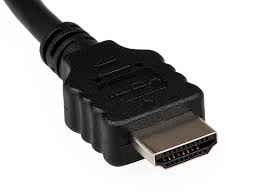
Connection to the projectors is via HDMI. Please bring your own HDMI lead.

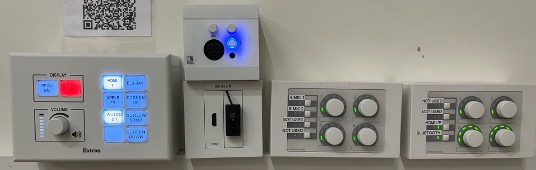
How to use the main hall Audio Visual System?

Please review our BVH Audio Visual system user guide

How do I send my file to you?

Please send a single file no larger than 100Mb.

Most email clients limit the size of attachments to no more than 20 or 25Mb.

You can email small files to:

bookings@beechvillage.org.uk

For larger file you will need to use a tool like WeTransfer or a file sharing tools like Microsoft OneDrive, Googledrive.

Please allow plenty of time to send the file to us.

How to control the Wellhouse heating?

The heating in The Wellhouse is underfloor and the heat source is an external air source heat pump. The design is to keep The Wellhouse warm and cosy at all times!

  1. The Wellhouse was refurbished in 2025 and is extensively insulated and the main source of heat loss is when the extrance door is left open. 
  2. Please ensure that you keep the entrance door closed to maintain the temperature.

The temperature is controlled by thermostats in each room. The temperature is normally set based on a schedule but can be manually overridden by pressing the in room thermostat.


How to use the Audio Visual system in the main hall?

The main hall has a range of audio visual equipment to support:

  • Music and dance played through a 2 channel disco sound system with disco lights and a choice of inputs:
    • BlueTooth
    • 3.5mm jack plug
    • HDMI
  • Presentation from a computer using an HDMI input
  • Public address using a microphone
  • Film and theatre presentations to our 4.5M wide screen using a 4K UHD 7,500 Lumens laser projector from:
    • UHD Blu-ray disc
    • Digital streaming services for example BBC iPlayer
  • Live events broadcast using digital streaming services

How to use the Audi Visual (AV) system

Please review our BVH Audio Visual system user guide

Please note:

  1. Whilst the hall has a Premises License that covers these activities the hirer is responsible for ensuring they have the appropriate copyright licenses for the materials that they use.
  2. As we are located in a quiet and peaceful village with close neighbours we specify a maximum noise level in our terms and conditions. For more information please see this FAQ article:
    • clientsite.uk/faq/is-there-a-limit-on-the-volume-of-music/
  3. Usage of some our Blu-ray player or microphones requires access to our media cupboard which must be arranged in advance.

How to use the Dishwasher in the kitchen?

The dishwasher is a ‘commercial’ dishwasher. Unlike a home dishwasher, the system is reliant on pre heating the water to enable a rapid cycle time. This works well if you follow a few simple instructions

  1. Allow 20-40 minutes for the machine to pre-heat
  2. Always rinse food debris off the plates before washing
  3. Always remember to follow the draining down instructions at the end of the event

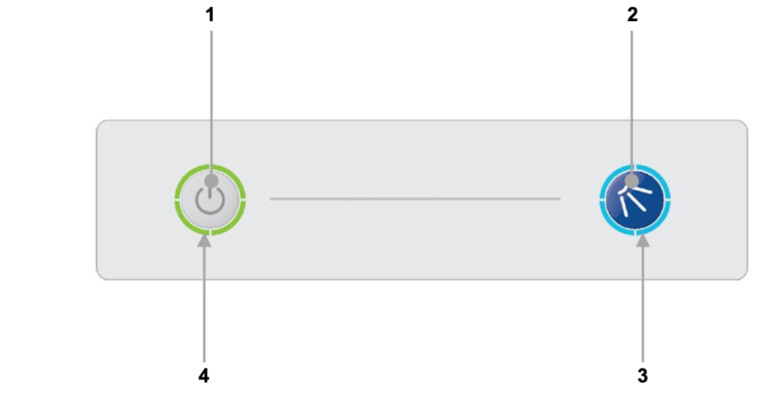
To operate the dishwasher please use the buttons on the front of the machine:

  1. On/Off button
  2. Cycle button
  3. Cycle indicator
  4. Heating indicator

Turning on the machine

To turn on the machine ensure the door is closed and press the On/Off button (1) on the keypad of the machine, the display will illuminate, the machine will start to fill automatically as long as the door is closed.

Once the wash tank is filled and both tanks are up to the required temperatures the heating indicator will illuminate green to indicate the machine is ready to run a cycle.

  1. This will take approximately 20-40 minutes.
  2. During the fill stage the heating indicator (4) will flash amber.

Loading a basket

Before loading a basket rinse off any food waste:

  • Always remove excess food/debris from any dishes/glasses to be washed. DO NOT use the machine as a waste disposal unit.

Long cutlery, such as ladles and long knives etc., must be placed horizontally on the open basket this will avoid possible collision with wash/rinse arms.

Starting a cycle

To start a cycle, follow the instructions below.

  1. Open the door
  2. Load the full basket, ensuring that bottom and top arms rotate freely.
  3. Close the door
  4. Press the cycle button (2).
    1. The cycle will start once the machine has achieved its correct water levels and temperatures.
    2. During the cycle the blue cycle indicator (3) will be illuminated blue.
    3. The cycle will run for approximately 3 minutes.
  5. At the end of the cycle, once the cycle indicator (3) has gone out. Open the door and remove the basket
  6. Reload the machine and repeat as required.

Please note:

  1. Do NOT open the door during a cycle
  2. The machine has a heat interlock to ensure that the rinse is in accordance with environmental health requirements. This will extend the wash cycle if the rinse boiler has not achieved the required temperature.
  3. If the cycle button is pressed before the machine has reached the required levels the cycle indicator (3) will illuminate blue to indicate that a cycle has been selected, the heating indicator (4) will flash amber and the machine will automatically start when the requirements have been met.

Warning

Items in the basket may be wet and will dry in a short time due to evaporation.

Be aware: Items may be hot when removed from machine

End of event, please drain the machine

It is very important the machine is drained down at the end of each working day. To fully drain down the machine follow these instructions:

  1. Close the door to the machine
  2. Press the On/Off button (1) to turn off the machine.
  3. Press the cycle button (2)
  4. The cycle indicator (3) will flash blue.
  5. The machine will drain down the wash tank.
  6. The machine will do a self-rinse.
  7. When the cycle indicator (3) goes out the drain cycle is complete.

How to use the Glasswasher (in the lounge/bar area)?

  1. Prepare dishwasher
    1. Open door, and put water plug in base of washing area, under tray.
    2. Replace tray, close door, and push in left hand power button.
  2. Washer should now fill, and heat the water – heating light will glow.
    1. When water is hot the orange light by right hand button will go out.
    2. It is now ready to use.
  3. To wash glasses:
    1. Fill glass tray, and when ready,
    2. Close door, then
    3. Push-and-hold right hand button in for a second or two.
    4. Washing cycle will now start – and end after around 3 minutes.
  4. Glasses will now be hot, and clean.
    1. Either leave to air or dry with towel and replace on shelf
  5. At end of evening:
    1. Remove water plug, rest it in the tray, and close door.
    2. Water will now pump out automatically.
    3. Check inside that it is empty.
    4. Press power switch and see power light go out.
    5. Close door.
  6. Any problems, ask a Committee member near you!

How to use the screen in the entrance hall?

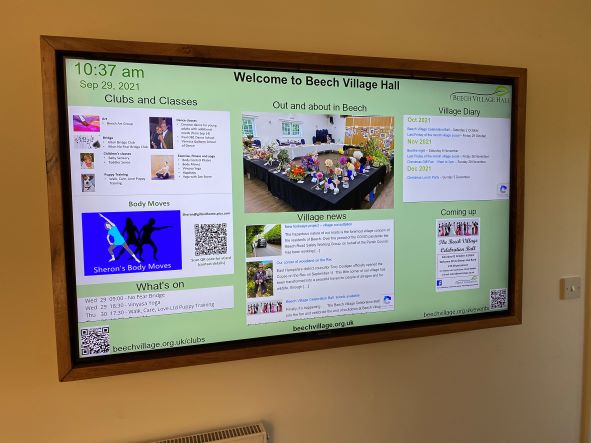
If you have booked one of our packages you are welcome to use our digital signage system. The system includes:

  1. The large TV screen in the main corridor
  2. A smaller monitor in the lounge bar area
  3. Software to schedule the display

For example, you might want to show a static welcome page, a table plan or a scrolling selection of family photographs.

You will need to provide us with the material one week in advance.

You will need to provide us with:

  1. A Powerpoint, pdf or .mov file containing the material you wish to show, at least 7 days in advance of the hire date.
  2. By default, we will schedule your material so that it appears on the screen during the hours you have booked the Hall. If you only want it to show for a specific period of time, let us know.
  3. If you provide a multi page PDF or PPT file, each page will appear for 5 seconds by default. This can be adjusted if you let us know how long you want each page to appear for.

Please note:

  1. The TV screen is managed remotely by us and you will not be able to make any changes on-site.
  2. There is no provision for sound on this system.
  3. It is your responsibility to ensure that you have the appropriate approvals to use the material you send us. This may include copyright or a licence for images, and permission from people appearing in the pictures (or, where applicable, their parents or guardians).
  4. To deliver this service, we will upload the file you provide onto the platform of our service provider, Yodeck. We will delete all your materials from the platform shortly after your event

How to use the sound system?

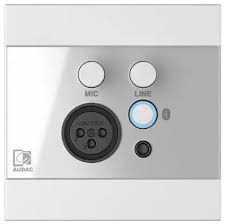
The easiest way to use our sound system is via a Bluetooth connection.

  • You need to be in the far right corner of the main hall to connect


  • Press the button indicated to start Bluetooth:
  • You should connect your phone/laptop to the device named ‘WP225’
  • You will then be able to play music from your phone/laptop and also control the volume level.

Please note:

  • Connect to our wifi first to improve streaming
  • You will need to keep your bluetooth device within range of our amplifier

Alternatively, you can connect by cable:

The Bluetooth connection box and the box beneath it also have sockets to connect via:

3.5mm jack

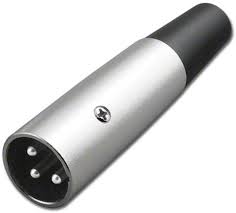
3 pin XLR microphone plug:

Or HDMI:

How to use the main hall Audio Visual System?

Please review our BVH Audio Visual system user guide

Is there a limit on the volume of music?

As we are located in a quiet and peaceful village with close neighbours we specify a maximum noise level in our terms and conditions.

  1. We ask that windows and external doors are closed when loud music is being played inside the hall.
  2. We prohibit the playing of music outside of the hall without our express permission.

We have a number of system to help monitor and control noise levels:

  1. A sound decibel meter to enable hirers to understand the noise level in real time
  2. A noise monitoring service provided by Minut that records the noise level in the hall. Please note that we do not record conversations. Please use this link for the Minut privacy policy
  3. A noise limiting system. The noise limiter has two parts”:
    1. A ‘traffic light’ display in the main hall. The light flash orange as the noise level nears the limit and red when the limit is exceeded
    2. A power cutout to the main hall when the noise limit is exceeded for more than 10 seconds.

What format of digital file do you require to use the screen in the entrance hall?

For the large screen in the entrance hall you shoud create a single digital file:

  • Landscape format with an aspect ratio of 1920 x 1080 (16:9)

For the small screen in the lounge/bar area:

  • Portrait format with an aspect ratio of 1920 x 1080

We can process most file formats eg PPT, MOV, JPG and PDF.

We request you limit the size of the file to a maximum of 100Mb.

We hope this covers everything you need to plan and prepare for a successful event. We also have our Frequently Asked Questions page and should you have any problems our Problem Reporting page

For further information, please e-mail us or call 07501 187496 (office hours only).


Package Prices

16 December, 2023

From £20 per hour depending on day of week and time.
Minimum of 3 hours to include set up and tidy up time.
Read more

£125 incl VAT
4 hours between 0900 and 1700
Read more

£175 including VAT
5 hours between 0900 and 1700
Read more

£175 incl VAT
5 hours between 09:00 and 17:00
Read more

£275 (incl VAT)
1800 to 2300 plus 0900 to 1100 on the next day for tidy up.
Read more

The Wellhouse £10 per hour or £36 for 4 hour block. The Main Hall from £12 to 18 per hour depending on time and day. The Lounge £9 per hour or £32 for 4 hour block.
Health and Wellbeing rates are subject to joining our Practitioner community.
Read more

Our package costs from £1,200 to £1,500 including VAT, depending on the month
From Friday 1800, Saturday until 23:00 and then Sunday 0900 to 12 noon
Read more

  • « Go to Previous Page
  • Page 1
  • Page 2
  • Page 3
  • Page 4
  • Interim pages omitted …
  • Page 8
  • Go to Next Page »

  • About
  • FAQ
  • Legal